Webinar Course Google Slides Template Evaluation
In the rapidly expanding landscape of digital education and remote business communication, the quality of visual presentation often dictates audience engagement. The Webinar Course Google Slides Template, developed by Fountech, represents a specific tool designed to streamline this process for educators, trainers, and corporate presenters. This article provides an objective analysis of the template's features, intended use cases, and practical considerations to help potential users determine if it aligns with their specific project requirements.
Understanding the Webinar Course Google Slides Template
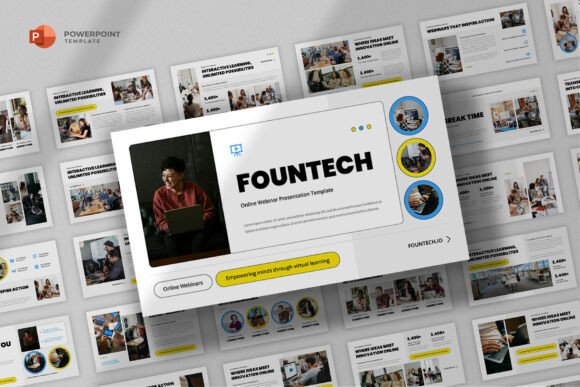
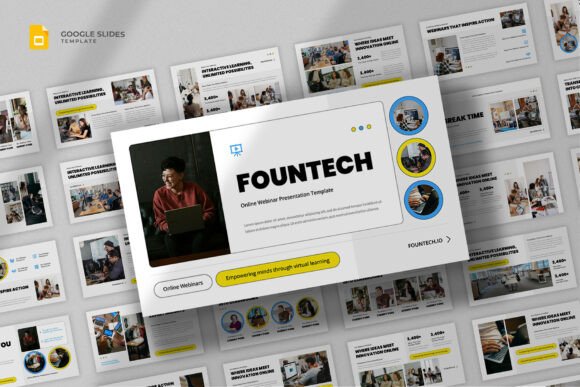
The Webinar Course Google Slides Template is a pre-designed presentation deck created specifically for the 16:9 widescreen format standard in modern video conferencing and online learning platforms. Unlike generic slide decks, this resource is structured to support the narrative flow required for educational content, seminars, and professional training sessions. It comprises 25 distinct slides that cover various stages of a presentation, from introductory overviews to detailed content delivery and concluding calls to action.
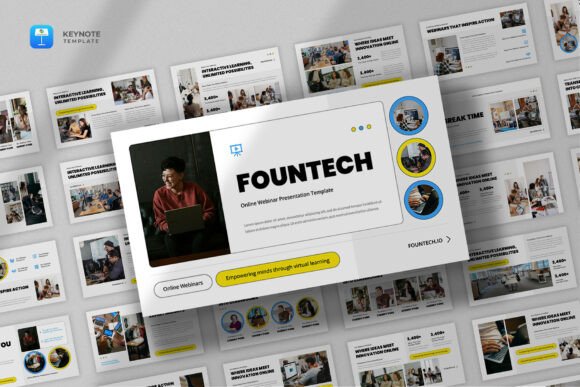
Technically, the product is delivered as a Google Slides file, ensuring cloud-based accessibility and collaboration capabilities. However, it also includes a .PPTX file version, offering compatibility with Microsoft PowerPoint for users who prefer desktop software or need offline editing capabilities. The design philosophy behind the template emphasizes a minimalist and modern aesthetic, utilizing clean lines and uncluttered layouts to ensure that the focus remains on the presenter's content rather than distracting graphical elements.
Key Features and Functional Capabilities
When evaluating a presentation tool, functionality is paramount. The Fountech template offers several core features that distinguish it from basic blank slides:
- Comprehensive Slide Count: With 25 total slides, the template provides enough variety to structure a full-length webinar or a multi-module e-course without needing to create every layout from scratch.
- Editable Graphics: All graphics included in the design are resizable and editable. This allows users to adapt icons, charts, and diagrams to fit their specific branding guidelines or data points.
- Typography Flexibility: The template supports access to over 100 free fonts, giving designers the liberty to choose typefaces that match their brand identity while maintaining readability across different devices.
- Support Documentation: The package includes a README_INFO.txt file and a HELPFILE.pdf, providing guidance on how to customize the elements effectively.
It is important to note a critical limitation regarding the visual assets: all images displayed in preview materials are for demonstration purposes only and are not included in the final downloadable files. Users must source their own photography and illustrations, which adds a layer of preparation work but ensures copyright compliance for commercial projects.
Benefits for Online Educators and Professionals
For individuals creating online courses, webinars, or corporate training modules, time efficiency is a significant benefit. Developing a cohesive visual system from zero can consume hours of design work. By adopting the Webinar Course Google Slides Template, creators can bypass the initial design phase and focus immediately on content development.
The minimalist approach offers a psychological advantage in learning environments. Cognitive load theory suggests that extraneous visual information can hinder learning. A clean, modern template reduces visual noise, allowing learners to concentrate on the instructional material. Furthermore, the multipurpose nature of the slides means the same asset can be repurposed for different contexts, such as shifting from a live seminar to a recorded e-course or adapting the structure for a startup pitch deck.
Collaboration is another key advantage. Since the primary format is Google Slides, multiple team members can edit the presentation simultaneously. This is particularly useful for organizations where subject matter experts provide content while marketing teams refine the visual polish.
Tradeoffs and Considerations
While the template offers significant advantages, there are tradeoffs to consider before adoption. The most notable constraint is the reliance on user-provided imagery. For users without access to stock photo libraries or graphic design skills, the "blank canvas" feel of the image placeholders may require additional effort to fill professionally.
Additionally, while the template is described as multipurpose, its specific structure is optimized for educational and informational flows. If a user requires highly complex animations, interactive elements, or non-standard layouts that deviate significantly from the provided 25 slides, they may find themselves constrained by the preset design. Customizing the underlying master slides in Google Slides can be challenging for users unfamiliar with the platform's advanced features.
Another consideration is the learning curve associated with the included documentation. While the presence of a help file is positive, users expecting immediate plug-and-play simplicity might still encounter minor hurdles when resizing vector graphics or adjusting font hierarchies to match their brand perfectly.
Ideal Use Cases
The Webinar Course Google Slides Template is a strong fit for several specific scenarios:
- E-Learning Development: Instructors creating asynchronous video courses or synchronous live workshops will find the slide structures well-suited for explaining concepts step-by-step.
- Corporate Training: HR departments and internal trainers can utilize the professional aesthetic for onboarding sessions, compliance training, or skill development workshops.
- Consulting and Coaching: Freelance consultants delivering client proposals or strategy sessions can leverage the clean design to project professionalism and clarity.
- Startup Pitches: Early-stage founders can adapt the portfolio and company profile slides for investor meetings, provided they tailor the narrative flow appropriately.
In these contexts, the balance between structure and flexibility allows the presenter to maintain a consistent brand voice while delivering complex information clearly.
When to Consider Alternatives
Despite its utility, the Webinar Course Google Slides Template may not be the optimal choice for every situation. Alternatives should be considered if:
- High Interactivity is Required: If the presentation relies heavily on embedded quizzes, clickable navigation, or complex animations that exceed standard slide transitions, dedicated e-learning authoring tools like Articulate Storyline or Adobe Captivate may be more appropriate.
- Unique Branding Constraints Exist: Organizations with extremely strict brand guidelines that do not allow for any deviation from specific color palettes or geometric shapes may find the template's base design too rigid to modify cost-effectively.
- Large-Scale Production: For enterprises producing hundreds of courses annually, investing in a custom-built internal design system or hiring a dedicated designer might offer better long-term scalability than purchasing individual templates.
- Non-Educational Focus: If the goal is purely artistic expression, a fashion show, or a creative portfolio that defies standard grid layouts, a more avant-garde or blank template might serve better.
Decision-Making Insights
To determine if this template aligns with your goals, evaluate your current workflow and resources. Ask yourself if you have the capacity to source high-quality images to replace the placeholders. Consider whether your presentation needs to support real-time collaboration, which favors the Google Slides format. Finally, assess if the 25-slide structure covers the majority of your content types or if you would spend excessive time restructuring the deck.
If your primary need is a professional, clean, and efficient foundation for delivering educational or business content online, the Fountech Webinar Course Google Slides Template offers a practical solution. It bridges the gap between technical complexity and visual appeal, enabling creators to launch their webinars and courses with confidence. However, for projects requiring deep interactivity or highly bespoke design elements, exploring specialized alternatives may yield better results.